
Puzzles for iPhone and iPad

Simple games
for a busy mind

Word Search, Sudoku, and Solitaire — plus a fresh puzzle every single day.

Somewhere to put your attention for ten quiet minutes. No account to set up, no ads waiting to break your concentration, and nothing locked behind a purchase. Open it, play, and come away a little lighter than you went in.

  • No account
  • No ads
  • No subscription
  • Plays offline

Download on the App Store

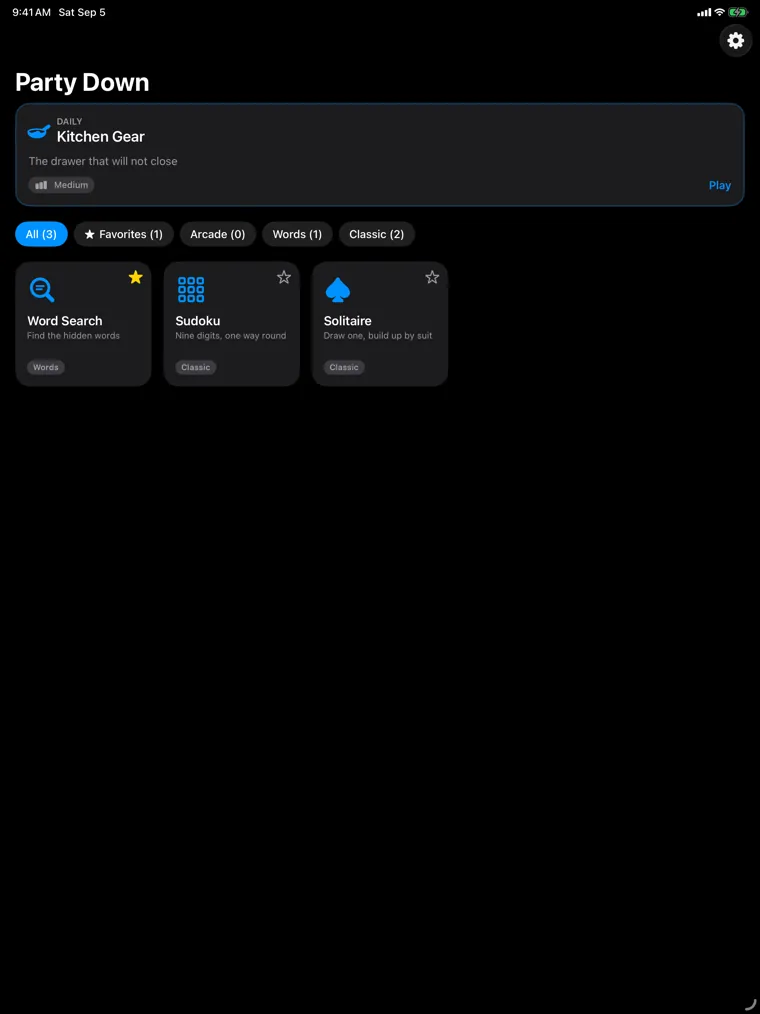
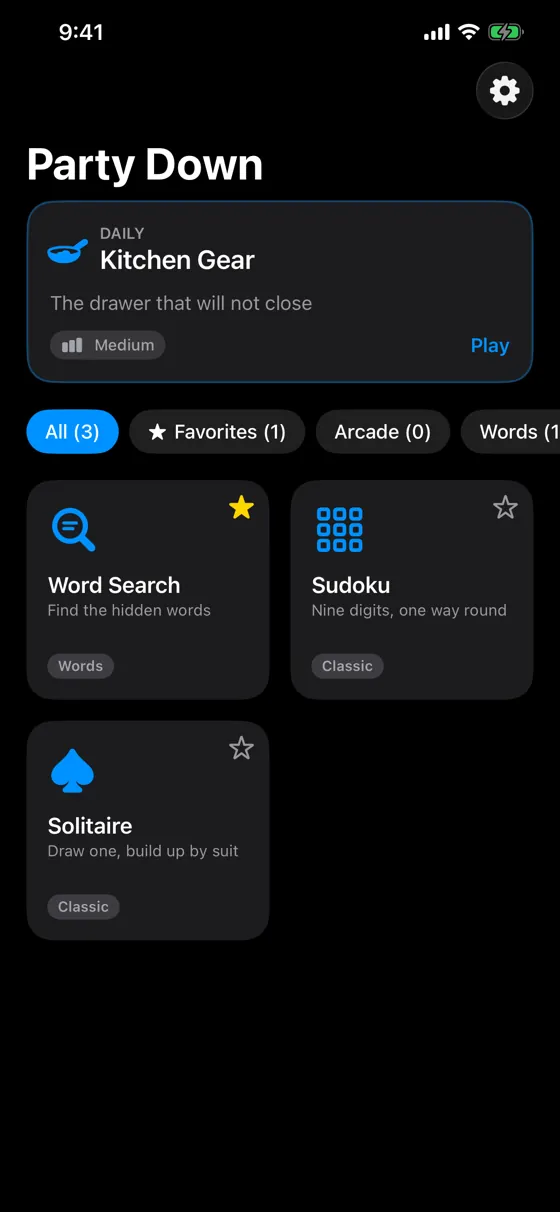
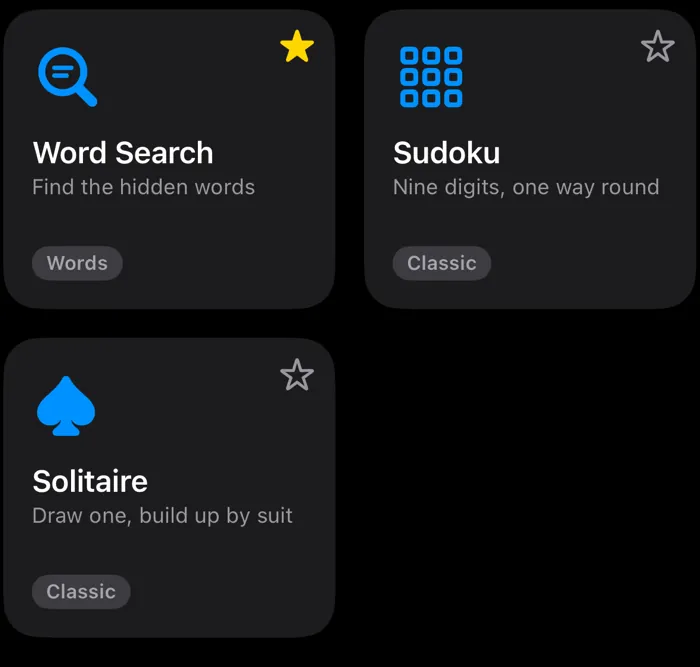
Party Down’s home screen, showing today’s daily puzzle above a grid of three games
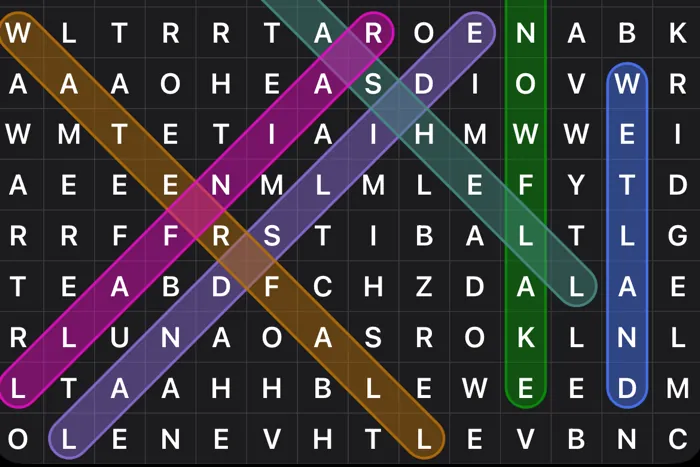
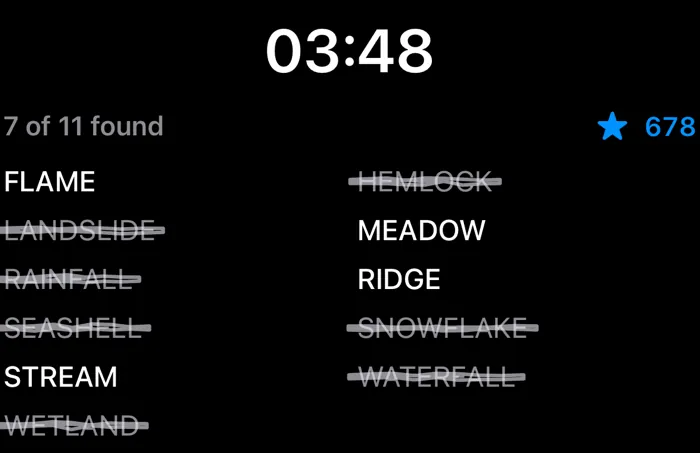
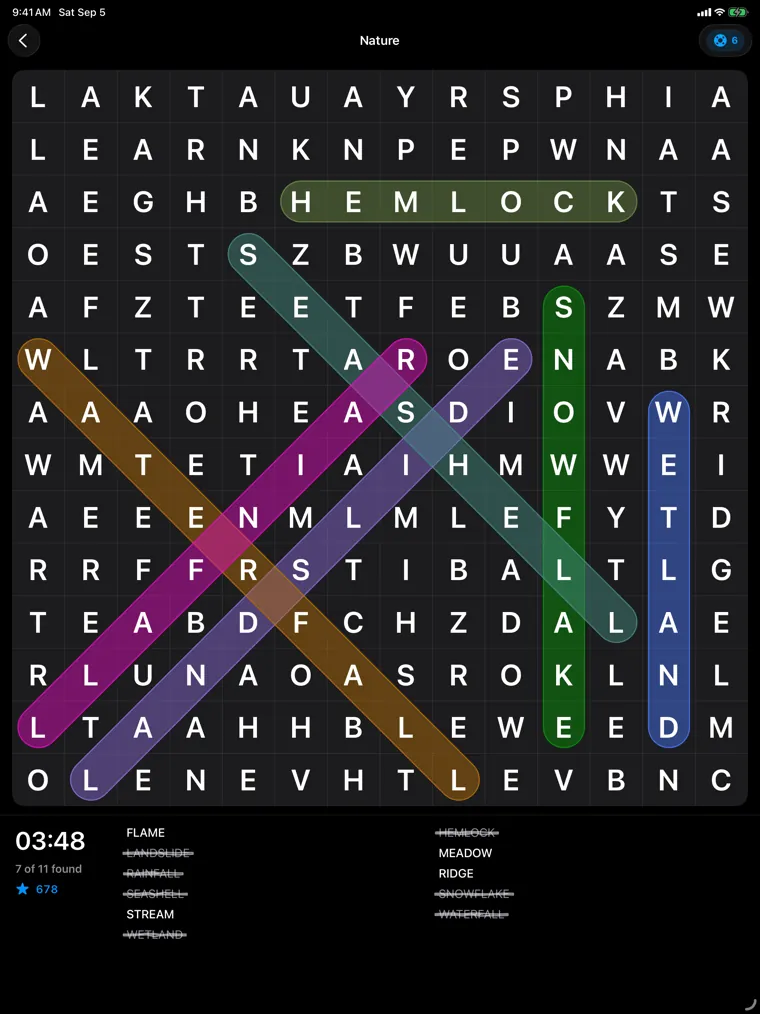
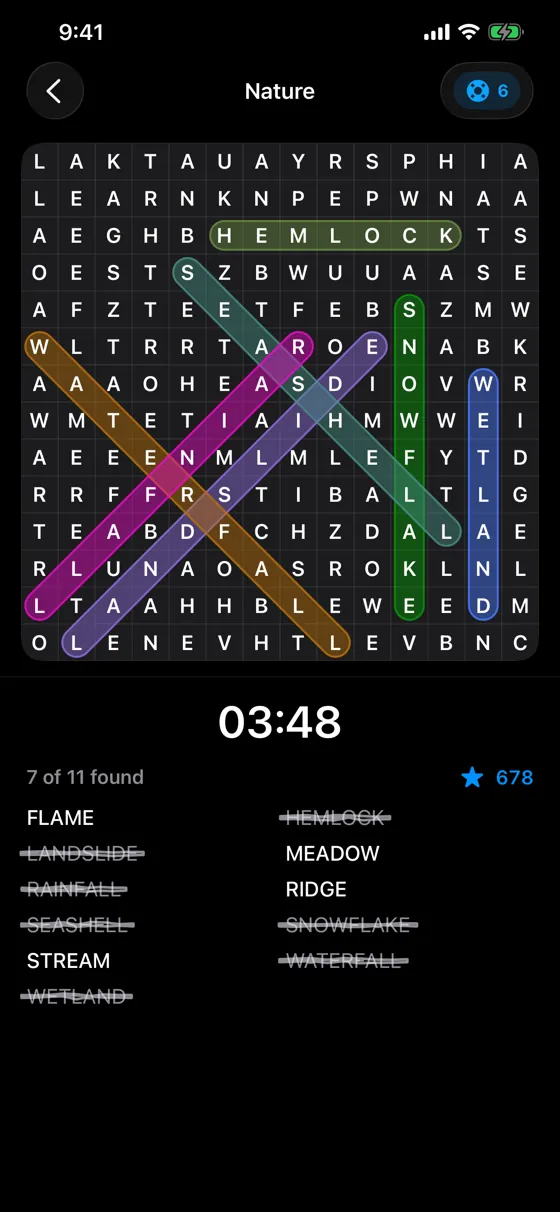
  • A word search game in progress, with several found words traced in different colors

    Word Search

    Trace the words and watch a plain gray grid fill up with color.

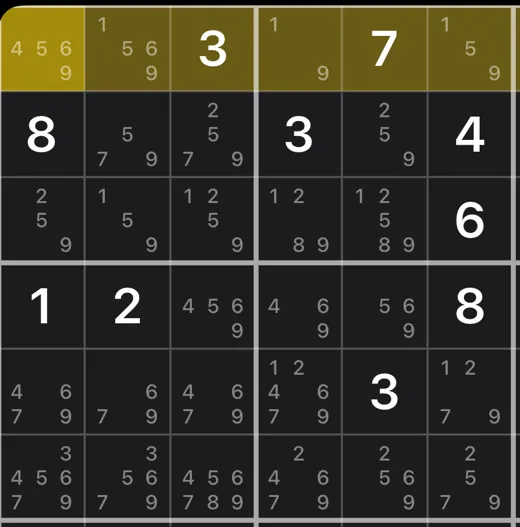
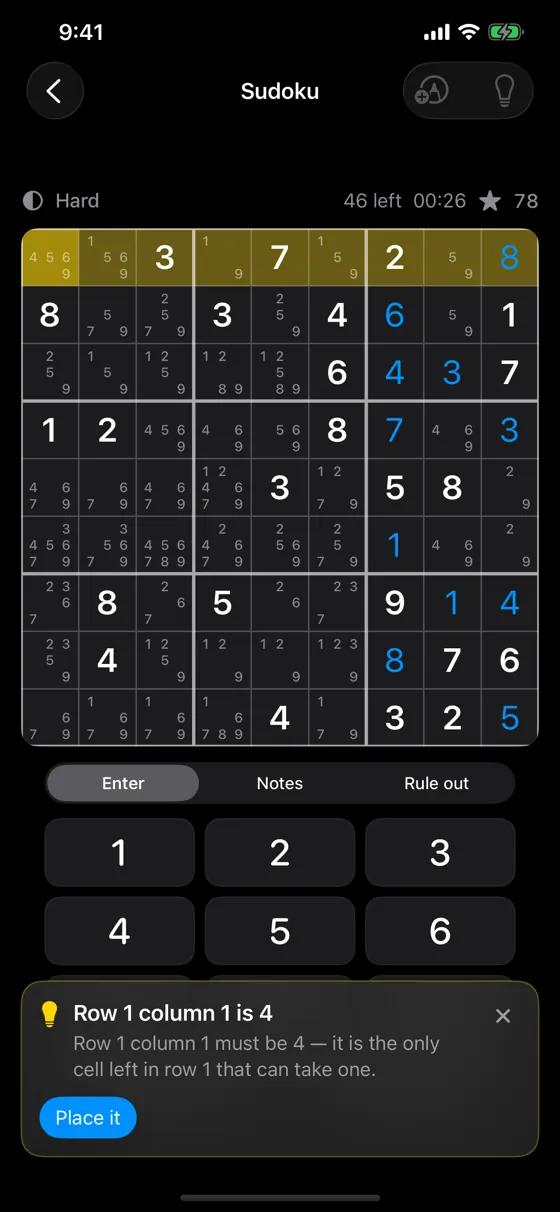
  • A sudoku board with notes filled in and a hint explaining the next move

    Sudoku

    Nine digits, one way they all fit — and a nudge that explains itself whenever you want one.

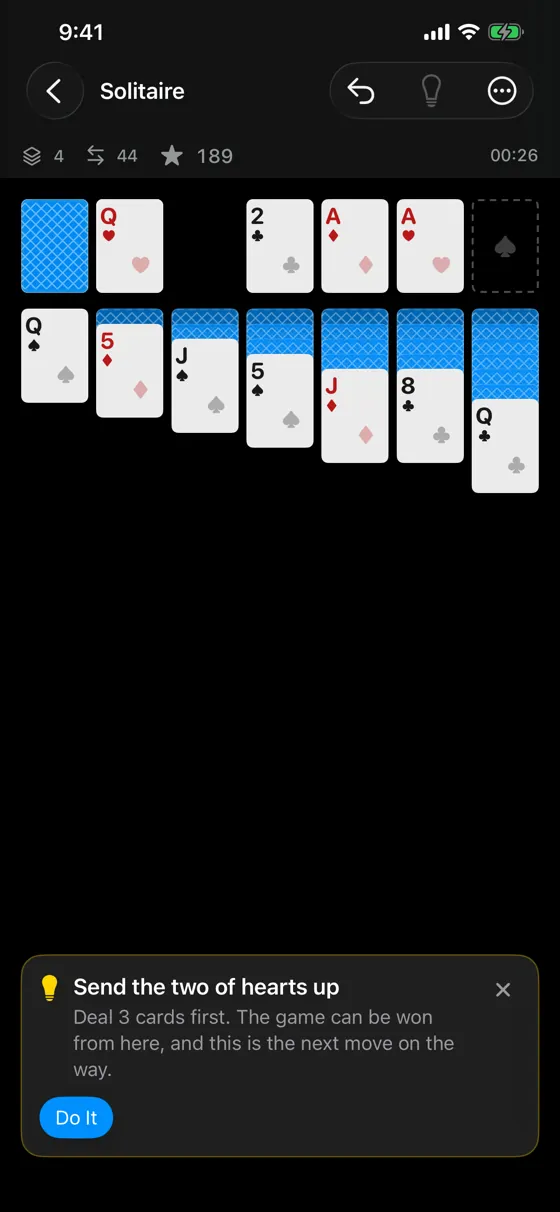
  • A game of solitaire in progress, with a hint suggesting the next move

    Solitaire

    The one you already know, dealt so that it can always be won.

3 + 1
Three games to choose from, and a daily puzzle that could turn out to be any of them.
47
Word search topics to wander through. Six are yours to pick; forty-one only show up in the daily.
16
Bite-size sudoku lessons, each one played out on a real board you can rewind.
36
Little milestones along the way. Lifelines are earned by playing, and you never have to buy one.
A row of filter chips reading All, Favorites, Arcade, and Words
Three game cards — Word Search, Sudoku, and Solitaire — with Word Search starred
Star a favorite and it’s waiting for you next time

Everything on one shelf

Three games, side by side. Star the one you keep coming back to and it moves to the front. In the mood for words today rather than numbers? Tap a filter and the shelf narrows to match.

The daily puzzle sits above them all, because on any given morning it could turn out to be any of them.
Every day

One puzzle a day, and everyone gets the same one.

A small ritual worth keeping. It’s ready before your coffee is, it takes a few minutes, and tomorrow there’ll be another one waiting. Some mornings it’s a word search on a topic you’ve never seen. Some mornings it’s a hand of solitaire.

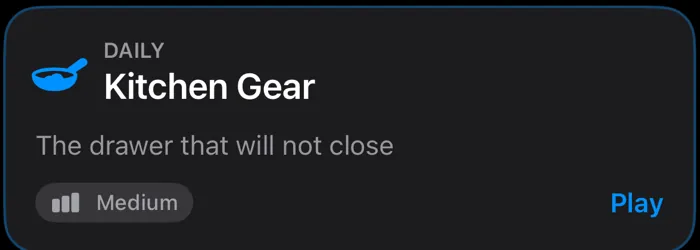
The daily puzzle card on the home screen, showing the topic Kitchen Gear at Medium difficulty
Today’s puzzle, waiting on the home screen

You know what you’re in for

The card tells you the game, the topic, and roughly how hard it’s going to be, so you can decide whether you have time for it right now. Today it’s Kitchen Gear — and there are forty more topics like it that only ever show up here.

Enjoyed it? Send the very same board to a friend with a short code. They get your puzzle, not one that’s merely similar.

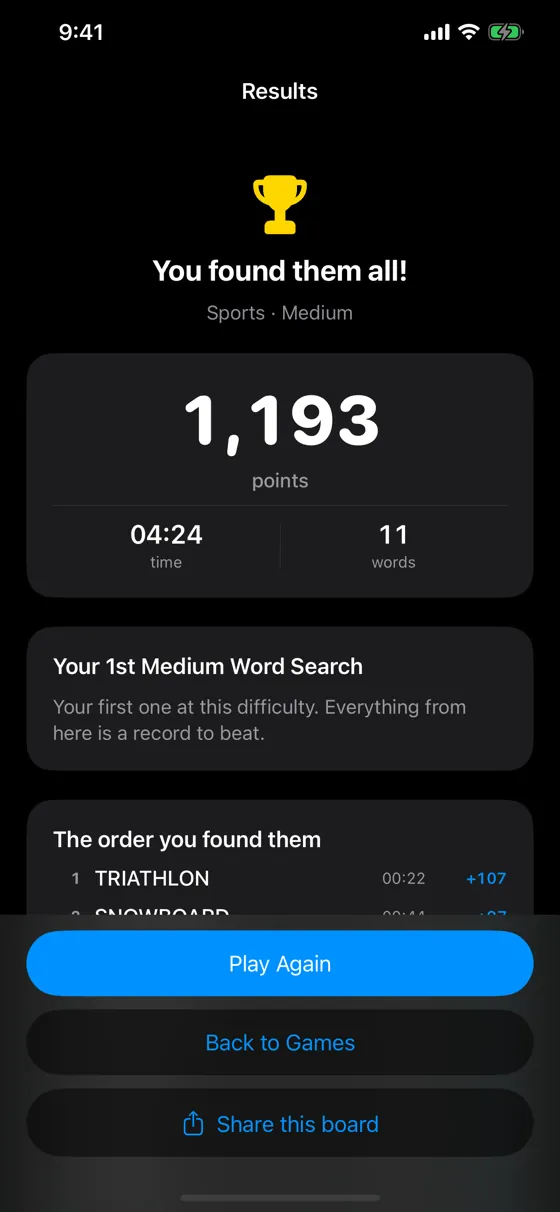
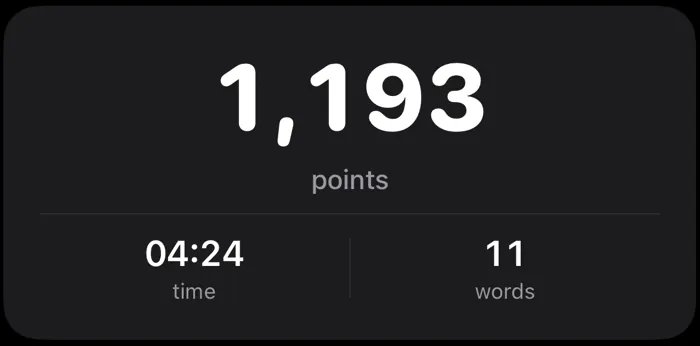
A finished word search result showing 1,193 points, a time of four minutes twenty-four, and eleven words
Your score, your time, and something to beat tomorrow

A streak worth keeping

Play three days in a row and you’ve earned yourself a lifeline. Keep it going and there’s another every week, and a handful every month. It’s a gentle reason to come back rather than a guilt trip — miss a day and the count simply starts again. Nothing you’ve already earned goes anywhere.

Daily scores are kept in their own place, so one brilliant Tuesday doesn’t quietly own your record forever.

The details

Where the daily comes from, and what happens with no signal

Always there when you are

  • Today’s puzzle arrives the moment you open the app.
  • No signal? No problem. The app builds the day itself, so there’s always something to play — on a plane, on the subway, anywhere.
  • Up late? Yesterday’s is still there waiting.

No peeking ahead

  • Tomorrow’s puzzle doesn’t exist yet, for anybody.
  • The answers aren’t sitting anywhere you could stumble across them.
  • If a puzzle ever arrives garbled, you get a clean one rather than a broken one.

After you finish

  • Every day you’ve played is kept, ready to look at again.
  • Pass a finished board on with a short code. No link, no account, and it works read out loud.
  • A lifeline at three days in a row, then one a week and a few a month.

Classic

Sudoku that teaches you as you go.

Most sudoku counts how many squares it left blank and calls that the difficulty. This one asks a better question: what will you actually have to figure out? Every board is rated by the hardest bit of thinking it needs — so Easy really is easy, and Expert really will teach you something.

A status strip reading Hard, 46 left, 26 seconds, 78 points
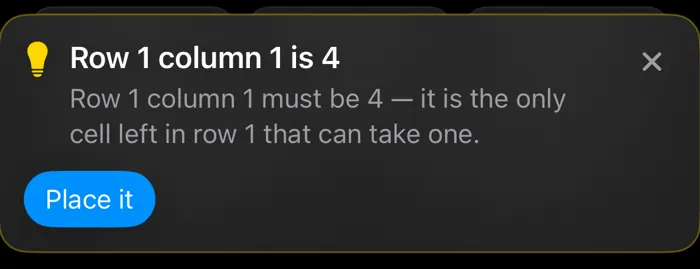
A hint reading: Row 1 column 1 is 4 — it is the only cell left in row 1 that can take one, with a Place it button
Not just the answer — the reason

A hint that explains itself

Ask for help and you don’t get a number dropped into a square. You get the reason, in a plain sentence, with the squares it depends on lit up. Read it, see it, then place the digit yourself — that’s how it sticks.

It won’t spring anything on you, either. Pick Easy and the reasoning stays easy; the app isn’t going to start talking about X-Wings out of nowhere.

Nine sudoku squares filled with small penciled candidate digits
A picker with three modes: Enter, Notes, and Rule out
Scribble in the margins, just like paper

Three ways to think out loud

Pencil in what a square could still be. Cross off what it definitely isn’t. Or pick a digit and light up everywhere on the board it lives, or could live.

And if you’d rather not fill in every note by hand, the app will do it for you so you can get straight to the interesting part.

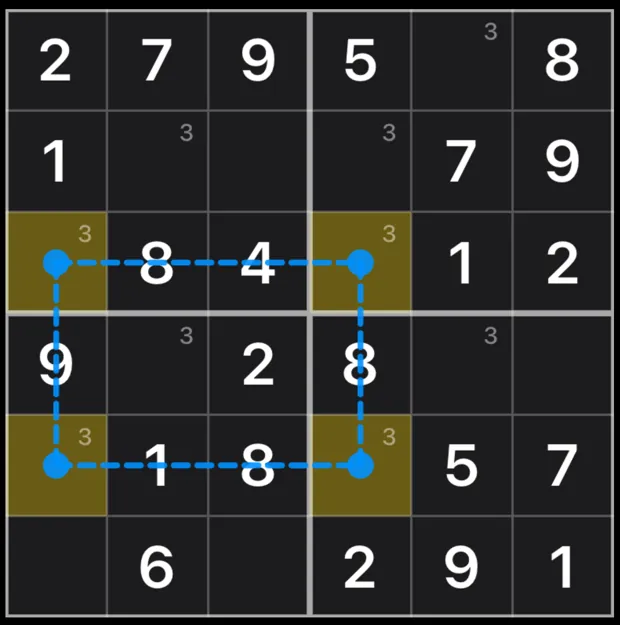
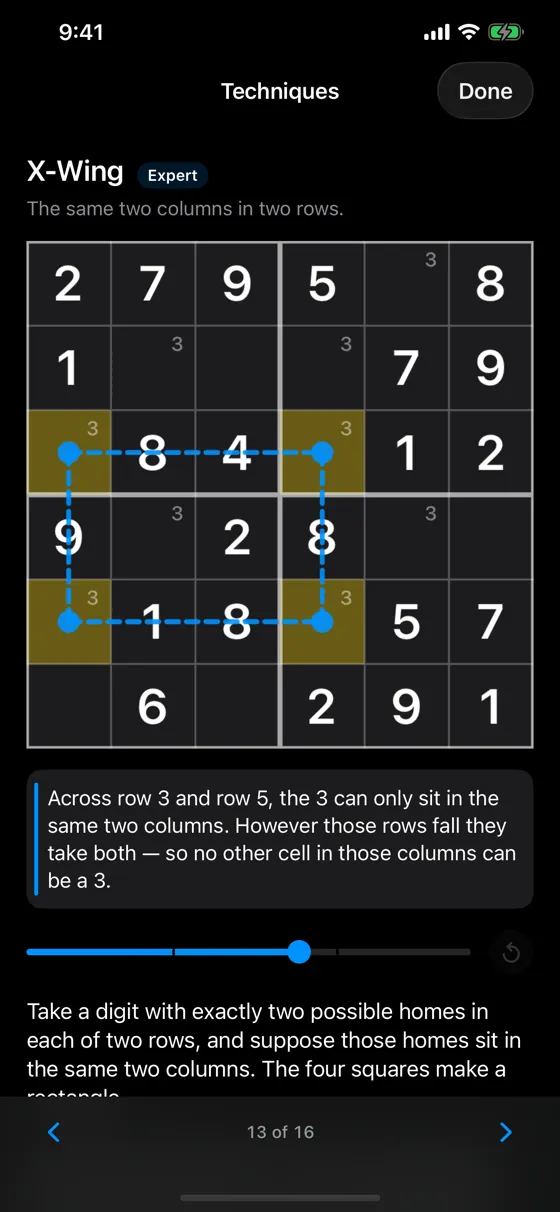
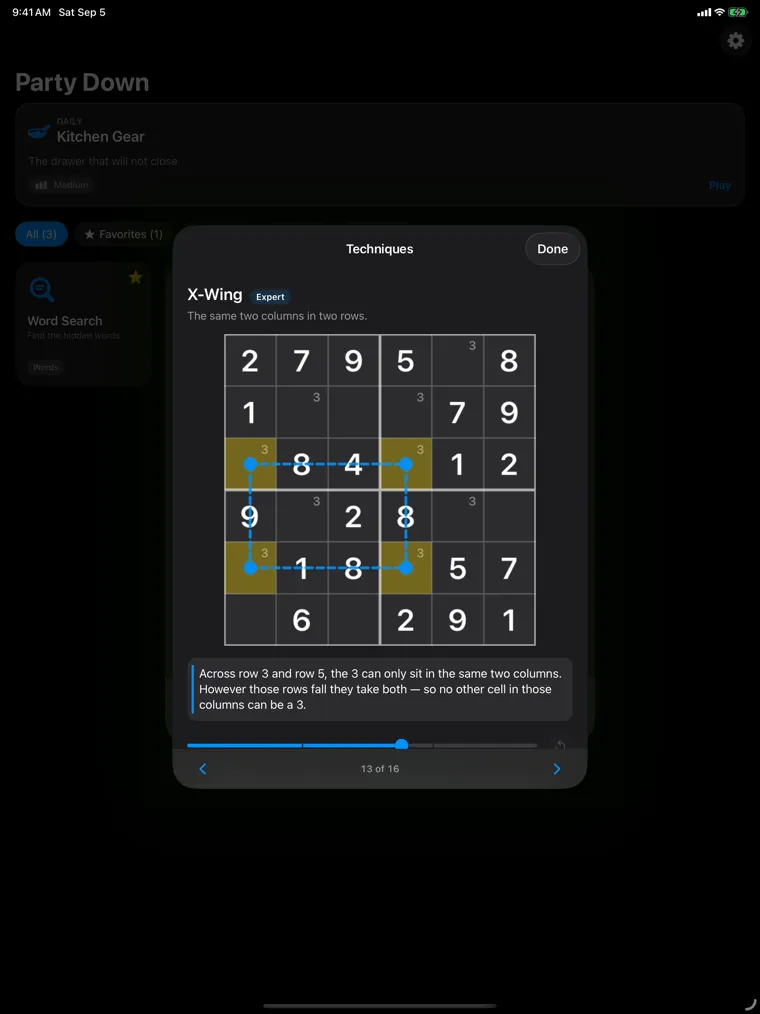
An X-Wing pattern drawn on a real sudoku board, with two rows and two columns joined into a rectangle
The explanation in words: across row 3 and row 5 the 3 can only sit in the same two columns, so no other cell in those columns can be a 3
The guide’s pager, showing page 13 of 16
Drag the slider and watch the logic land

Sixteen little lessons

There’s a whole guide built in: four pages on reading a grid and taking notes, then twelve on the techniques themselves, from the simplest one up to the ones that make you feel clever.

Nothing is explained in the abstract. Each lesson plays out on a real board, a step at a time, with a slider you can drag back and forth until it clicks.

The details

What each level will ask of you
Level What you’ll be working with What that feels like
Easy Singles There’s always a square with only one answer left in it. Fill it, and the next one appears.
Medium Pairs Two squares that between them own two digits — so nothing else nearby can have either.
Hard Intersections and triples “This digit has to be somewhere along here.” One idea, read in two directions.
Expert X-Wing, Swordfish, XY-Wing, XYZ-Wing Patterns stretched across the whole grid. This is the good stuff.

An honest label

  • Easy is genuinely easy and Expert genuinely isn’t. The level is a promise, not a guess.
  • You’ll never have to guess your way through. If a board can’t be solved by reasoning alone, it doesn’t get made.
  • No board is padded out with extra blank squares just to look intimidating.

When it goes sideways

  • Made a mistake ten moves ago? The app notices and says so, rather than letting you grind away at something impossible.
  • It winds back to your last good position by playing the moves in reverse, so you can see where it went wrong.
  • Squares you’ve noted down to a single digit fill themselves in once they’re settled, so the home stretch isn’t busywork.

How the points work

  • You’re rewarded for the thinking a square actually took.
  • The score only goes up. Sitting and staring at it costs you nothing.
  • A hint is the one thing that costs, and you’re told the price before you spend it.

Fifteen milestones

Its own set, kept apart from word search. Finish boards, finish them quickly, and finally finish one at that level you’ve been avoiding.

Classic

Klondike, minus the deals you can’t win.

Draw one, build up by suit, exactly the way you remember it. The difference is that the app has already figured out whether this hand can be won — so when it doesn’t go your way, that’s on you, and there’s something oddly satisfying about knowing it.

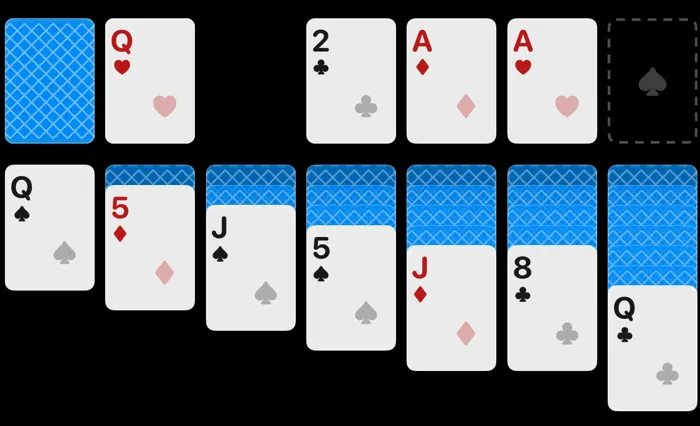
A game of solitaire partway through, with two aces up and columns turning over
Draw one, seven columns, four aces to find

Every deal is a winnable one

Switch it on and no hand reaches the table until there’s a way through it. No more twenty minutes lost to a deal that was dead from the very first card.

Prefer to take your chances? Turn it off and play whatever the shuffle gives you.

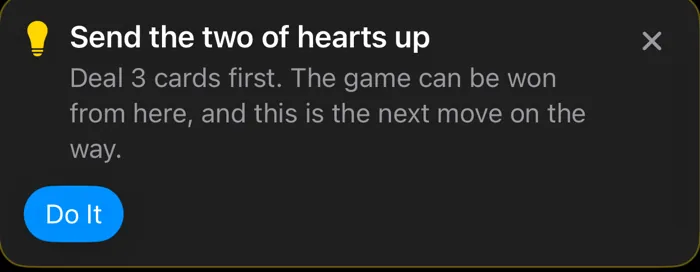
A hint reading: Send the two of hearts up. Deal 3 cards first. The game can be won from here, and this is the next move on the way
It’ll tell you when the game is still yours to win

A hint that’s honest with you

When there’s a clear path to the win, the hint hands you the next move along it and tells you so. When it isn’t certain, it says that instead — because “this looks promising” and “this wins” are very different things, and it won’t pretend otherwise.

And if the game genuinely can’t be won anymore, it tells you, rather than letting you shuffle through the deck forever, hoping.

A status strip showing 4 cards in the stock, 44 moves, 189 points, and 26 seconds
Cards left, moves made, points earned

Score it your way

Modern is the default, and it only ever goes up: points for cards sent home, cards turned over, and columns cleared. Nothing drains away while you sit and think about it.

Or pick Klondike for the old desktop scoring you probably grew up with — ticking clock, deck penalty and all. Games are filed separately by which one you used, so your records never get mixed up.

The details

Both ways of scoring, and what’s watching the table
Scoring What earns you points What costs you
Modern Default Cards sent home, cards turned over, columns cleared. Hints, and nothing else. The score never falls on its own.
Klondike Ten for a card sent home, five for a card turned over. Two every ten seconds, and a hundred each time you go back through the deck.

Always watching

  • Before the deal, when winnable deals are switched on.
  • After every single move, so a hand that’s died is caught the moment it dies.
  • And it thinks a little harder when you’re the one waiting on it.

Taking it back

  • Undo, one move at a time.
  • Or send the whole game back to the deal — played out in reverse, so you can watch it unravel.
  • Once every card is face up, the table finishes itself. No clicking through the obvious part.

Right where you left it

  • Step away mid-game and it’s waiting, with a quick summary before you pick it back up.
  • Nothing is lost because somebody interrupted you.

Earned as you play

Stuck? Here’s a hand.

Hints are paid for in lifelines, and you earn those by playing. No ad to sit through, no timer counting down until you’re allowed another one. If you’d rather not wait, there’s a small shop tucked away with a few packs to buy, but nothing in the game ever needs it.

A toolbar badge showing a lifeline token and the number six
What you’ve saved up, always in view

A little help, not the answer

The cheap ones narrow things down without spoiling it — light up the quarter of the board where something is hiding, or every letter of your choosing. The expensive one simply finds the word for you, and you get no points at all for it.

That’s the trade, and it’s entirely yours to make.

The five

What each one does, and how many lifelines it’ll cost you
Hint Cost What it does
Quadrant 1 Lights up the quarter of the board where a word you haven’t found is hiding.
Letter Hunt 1 Pick a letter and every one of them glows.
First Letter 2 Shows you where a word begins. Which way it runs is still your problem.
Freeze Chaos only 2 Holds the board still for twenty seconds. Blessed relief.
Reveal 3 Just finds a word for you. You get nothing for it, and sometimes that’s fine.

Five ways to earn lifelines

  • Beat your own best time on a topic at a level.
  • Keep a streak going — one at three days, one every week, three every month.
  • Hit a milestone — twenty-one in word search, fifteen in sudoku.
  • Find words that weren’t on the list — enough of those and they pay out.
  • Play a daily that happens to be carrying a few.

Worth going after

  • Quick Study — a Hard board in under five minutes.
  • Before Breakfast — a daily puzzle in under four.
  • Well Read — finish a game in every single topic.
  • Glutton for Punishment — a Chaos game with fog, phantoms, and the miss penalty all switched on.

Earned, and bought

  • Your total is counted up from the games you’ve actually played, plus anything you’ve bought, so it can’t quietly drift or vanish.
  • Every lifeline is listed with where it came from and the day you got it.
  • You can hold five earned lifelines at a time, so spend them. Bought ones don’t expire and aren’t capped, and your earned ones always get spent first, so buying never stops you earning.
  • Earning and spending work with no signal at all. There’s no server keeping score — just your phone.

Good to know

Built to be lived with.

The things that don’t show up in a screenshot: how it sounds, how it behaves once you’ve turned your accessibility settings up, and what it does — and doesn’t — do with anything about you.

The same word search on an iPad, with the board and the word list side by side
The same game, given room to breathe

It fits the screen you’re on

On a phone the word list sits under the board. On an iPad it moves alongside, so you can take in everything at once. Sudoku, solitaire, and the results screens all rearrange the same way, and the board always gets first claim on the space.

Portrait, landscape, phone, tablet — none of them is a squeezed version of another.

The details

Accessibility, sound, reminders, and your privacy

Accessibility

  • VoiceOver reads the board properly — not just a letter, but where it sits and what it’s part of.
  • Turn on Reduce Motion and everything settles down, the board’s own animations included.
  • Larger text and bold text are followed, and nothing falls apart at the big sizes.
  • Found words are crossed off the list as well as colored in, so color isn’t doing the work on its own.

Sound and feel

  • A pencil for word search, cards for solitaire, a soft tick for a sudoku square.
  • Sound and vibration have their own switches. Have one, both, or neither.
  • It follows your device’s volume, and it never interrupts whatever you’re already listening to.

Light or dark

  • Light, dark, or whatever your phone is doing — the app has its own setting for it.
  • Built for a dark screen first, which is where a bright puzzle board looks best.

Reminders

  • Off until you decide otherwise.
  • One a day at most, and only when there’s a reason: a streak going, today’s puzzle waiting, a board you left half-finished.
  • If there’s more than one reason, you get the one that matters most.

Your data

  • No account. Nothing to sign up for, nothing to log into.
  • Your scores, streaks, and settings stay on your phone.
  • Off by default: there’s a switch for sharing anonymous usage data, and it stays off unless you turn it on.
  • Turn it on and the app sends notes on how the games are played — which ones, how long, where people get stuck. No personal data, nothing you’ve typed, and nothing that identifies you or your phone.
  • Turning it back off deletes it. Read the privacy policy.

Nothing you have to buy

  • No ads. Not one, anywhere in the app.
  • No subscription, and nothing at all locked behind a purchase.
  • Lifelines are earned by playing. You can buy more if you’d rather not wait for them.

Screens

Every screen, whole.

The full picture, if you’d rather just see it all.